Android App Functions: Making Shelfly Callable by AI Agents
How I implemented Android App Functions in Shelfly so AI agents can add items, check expiries, and manage my shelf without touching the UI

Shubham Singh
android
ai
app-functions
kotlin
gemini
What if an AI agent could open your Android app, add items, check what's expiring, and mark things as consumed, all without a single UI tap? That's exactly what Android App Functions enables, and I built it into Shelfly to see whether the agent story holds up.
What are App Functions?
The paradigm shift: apps that don't expose App Functions are invisible to AI agents. As agent-mediated interactions grow, that gap matters.
App Functions is an experimental Jetpack API (Android 16+) that lets you annotate Kotlin functions in your app so on-device AI agents (like Gemini) can discover and invoke them in response to natural language. Think of it as Android's answer to MCP (Model Context Protocol), an OS-level capability registry agents can discover and call. Instead of a user navigating to your app and tapping through a flow, an agent finds the right function and calls it directly. The OS handles IPC, schema registration, and permission enforcement.

What is Shelfly?
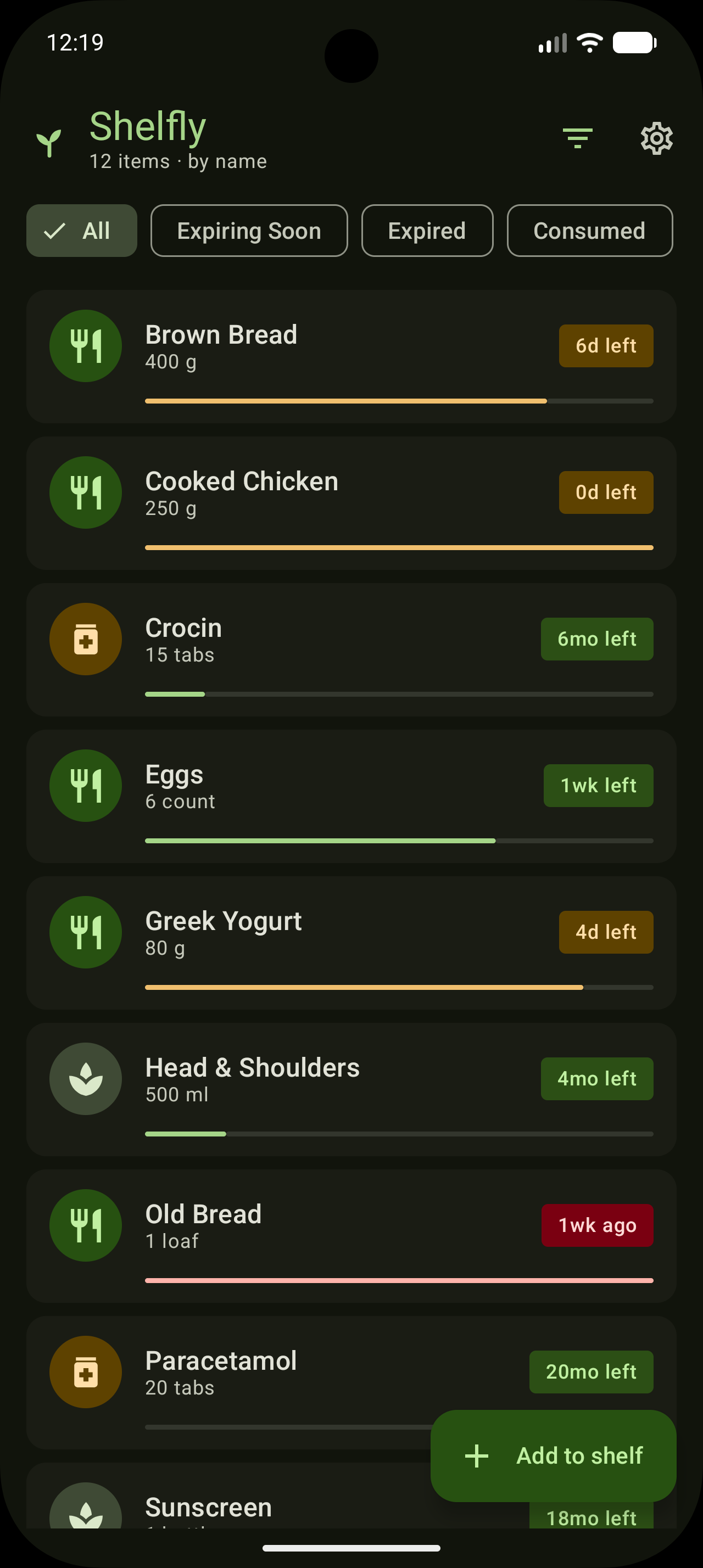
Shelfly tracks expiration dates for household items. You add items with a name, category, expiry date, and quantity. The app monitors them, sends daily notifications, and color-codes their status: Fresh, Expiring Soon, Expired, or Consumed. It's small and focused, so every core action maps cleanly to a function an agent could invoke.
Demo
Here's Claude controlling Shelfly end-to-end via ADB: adding an item, listing what's expiring soon, and marking something as consumed, all from natural language. Notice that no UI is touched; every action goes through the agent:
Setting up the dependencies
Add the Jetpack AppFunctions library and KSP compiler to your module's build.gradle.kts:
1ksp {
2    arg("appfunctions:aggregateAppFunctions", "true")
3}
4
5dependencies {
6    implementation("androidx.appfunctions:appfunctions:1.0.0-alpha09")
7    implementation("androidx.appfunctions:appfunctions-service:1.0.0-alpha09")
8    ksp("androidx.appfunctions:appfunctions-compiler:1.0.0-alpha09")
9}
The KSP compiler reads your @AppFunction annotations and KDoc comments at build time, generating metadata the OS indexes via AppSearch so agents can discover your app's capabilities.
Defining the data transfer object
App Function parameters and return types must be annotated with @AppFunctionSerializable. KDoc on these fields is what the agent sees, so write it like documentation, not code comments.
1@AppFunctionSerializable(isDescribedByKDoc = true)
2data class ItemDto(
3    /** Unique identifier for the item. */
4    val id: String,
5    /** Display name of the item (e.g. "Whole Milk"). */
6    val name: String,
7    /** Category such as "Dairy", "Medicine", or "Skincare". */
8    val category: String,
9    /** Expiry date in ISO-8601 format (YYYY-MM-DD). */
10    val expiryDate: String,
11    /** Optional quantity (e.g. 2). */
12    val qty: Int? = null,
13    /** Optional unit (e.g. "bottles"). */
14    val unit: String? = null,
15    /** Days until expiry — negative means already expired. */
16    val daysUntilExpiry: Int,
17    /** Current status: GOOD, EXPIRING_SOON, EXPIRED, or CONSUMED. */
18    val status: String,
19    val consumed: Boolean,
20    val consumedAt: String? = null,
21    val createdAt: String,
22    val notes: String? = null
23)
Writing the App Functions
Each callable function is a suspend fun annotated with @AppFunction. The first parameter is always AppFunctionContext (injected by the OS). The rest is what the agent fills in.
1class ShelflyAppFunctions @Inject constructor(
2    private val itemRepository: ItemRepository
3) {
4
5    /**
6     * Adds a new item to the shelf.
7     * @param name The display name (e.g. "Almond Milk").
8     * @param expiryDate Expiry date in ISO-8601 format (YYYY-MM-DD).
9     * @param category Category such as "Dairy" or "Medicine".
10     * @param qty Optional quantity.
11     * @param unit Optional unit (e.g. "cartons").
12     * @param notes Optional notes.
13     */
14    @AppFunction(isDescribedByKDoc = true)
15    suspend fun addItem(
16        appFunctionContext: AppFunctionContext,
17        name: String,
18        expiryDate: String,
19        category: String,
20        qty: Int? = null,
21        unit: String? = null,
22        notes: String? = null
23    ): ItemDto { ... }
24
25    /**
26     * Returns items expiring within the next N days, sorted by expiry date.
27     * @param withinDays Number of days to look ahead. Defaults to 7.
28     */
29    @AppFunction(isDescribedByKDoc = true)
30    suspend fun listExpiringSoon(
31        appFunctionContext: AppFunctionContext,
32        withinDays: Int = 7
33    ): List<ItemDto> { ... }
34
35    /**
36     * Marks an item as consumed.
37     * @param id The item's UUID.
38     */
39    @AppFunction(isDescribedByKDoc = true)
40    suspend fun markConsumed(
41        appFunctionContext: AppFunctionContext,
42        id: String
43    ): Boolean { ... }
44}
Wiring up dependency injection
Your Application class needs to implement AppFunctionConfiguration.Provider so the OS knows how to instantiate your function class.
1@HiltAndroidApp
2class ShelflyApp : Application(), AppFunctionConfiguration.Provider {
3
4    @Inject lateinit var shelflyAppFunctions: ShelflyAppFunctions
5
6    override val appFunctionConfiguration: AppFunctionConfiguration
7        get() = AppFunctionConfiguration.Builder()
8            .addEnclosingClassFactory(ShelflyAppFunctions::class.java) { shelflyAppFunctions }
9            .build()
10}
All 10 functions at a glance
Here's what the agent sees when it queries Shelfly:
| Function | What it does |
|---|---|
ping | Toolchain verification, returns "pong: <message>" |
addItem | Adds an item with name, expiry date, category, qty, unit, notes |
addItemFromMfg | Adds an item using manufacture date + best-before months |
listExpiringSoon | Items expiring within N days (default 7), sorted ascending |
listExpired | All expired items, sorted by expiry date descending |
listByCategory | Items filtered by category, sorted by expiry date |
getItem | Retrieves a single item by UUID |
markConsumed | Marks an item consumed with a timestamp |
updateExpiry | Updates an item's expiry date |
deleteItem | Permanently deletes an item by ID |
Testing with ADB
You don't need a Gemini integration to test. The app_function command-line tool lets you verify registration and invoke functions directly from the terminal:
1# Verify your functions are registered
2adb shell cmd app_function list-app-functions | grep -A 20 dev.ishubhamsingh.shelfly
3
4# Call a function
5adb shell cmd app_function call --package dev.ishubhamsingh.shelfly \
6  --function dev.ishubhamsingh.shelfly.appfunctions.ShelflyAppFunctions#ping \
7  --param message=hello
The list command dumps the full schema for every registered function: name, KDoc-derived description, and each parameter's name, type, description, and required/optional flag. It looks something like this:
1AppFunction{
2  id=dev.ishubhamsingh.shelfly.appfunctions.ShelflyAppFunctions#addItem
3  isEnabled=true
4  schema=AppFunctionSchemaMetadata{
5    description="Adds a new item to the shelf."
6    parameters=[
7      AppFunctionParameterMetadata{
8        name=name, type=String, isRequired=true,
9        description="The display name (e.g. Almond Milk)."
10      },
11      AppFunctionParameterMetadata{
12        name=expiryDate, type=String, isRequired=true,
13        description="Expiry date in ISO-8601 format (YYYY-MM-DD)."
14      },
15      ...
16    ]
17  }
18}
This schema is what an AI agent reads to understand your app's surface. When you write clear KDoc, this output becomes a precise instruction manual the agent can act on. Even better: Google's own docs suggest a prompt that turns any desktop AI agent (Claude, Gemini in Android Studio, etc.) into a live App Functions caller:
1Execute `adb shell cmd app_function` to learn how the tool works, then act as a
2chat agent aiming to invoke AppFunctions to fulfil user prompts for this app.
3Rely on the AppFunction description as instructions.
Give this prompt to any AI with terminal access and it will discover your app's functions, read their KDoc descriptions, and start calling them in response to natural language. No EAP needed. Works today on any API 36 device with ADB.
Things to know before you ship
- Android 16+ only. Runs only on API 36+ devices, which means
compileSdk36 too. - Still in alpha. The library is at
1.0.0-alpha09as of writing. The API surface may change. - Gemini only. As of May 2026, the only first-party system agent is Gemini. The
EXECUTE_APP_FUNCTIONSpermission is restricted to system-level callers, so arbitrary third-party apps cannot invoke your functions. - It's behind a private preview. Google is running an EAP to onboard select apps, but access is gated even after registration. Until you're in the EAP, ADB is your only way to test end-to-end.
- KDoc is the agent's instruction manual. Spend real time on KDoc. It's what the agent reads to decide when and how to call each function.
Source code
Shelfly is fully open source. Browse the App Functions implementation at github.com/ishubhamsingh/Shelfly, specifically ShelflyAppFunctions.kt and the appfunctions/dto package.
App Functions is one of those things that feels academic until you see it running: an AI agent navigating your app's capabilities without any UI scaffolding. Worth building for, even at alpha.